Don’t type, just say it.
The Quick app suite – apps for the moment between thought and action. Say it, type it, done – and back to your life in seconds.
umm so can you tell the team that the launch is i think not friday but monday because we are still waiting on the sign-off and yeah just tell them we will have something firm on thursday
Let the team know: launch moves to Monday, we are still waiting on sign-off. Firm date on Thursday.
Three times faster than typing.
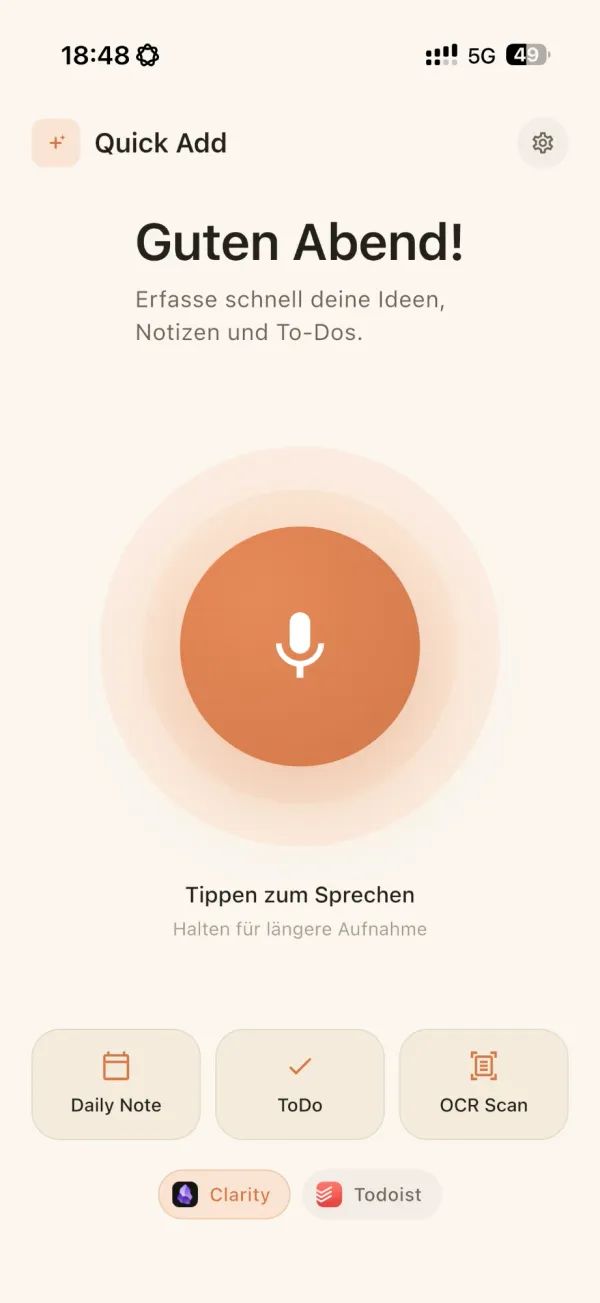
Speaking is faster than typing on a phone. Quick Add turns it into a finished entry instead of a raw transcript.
On a phone, with autocorrect and clean-up. And then you still have to sort, tag and file it.
Speak, done. Cleaned up, formatted and automatically in the app you already use.
Capture at the speed you think – anywhere, on any device.
Pause, think, change your mind mid-sentence. Quick Add understands what you mean, not just what you say.
Text that reads like you wrote it. Filler out, punctuation in, structure automatic.
No copy-paste. Notes and to-dos go straight to your apps – connect once, then never think about it again.
Four apps. One gesture.
Voice-first capture of notes and to-dos, plus OCR for scans — sent automatically to Obsidian, Capacities, Notion, Todoist & co.
Talk instead of typing — in mail, notes, chats and everywhere else.
Get an AI summary the moment you save an article, and decide in seconds whether it is worth your time.
One-tap save for links, files and photos — sorted automatically.
Your voice stays yours.
Your recordings and notes stay local or go only to the AI service you choose yourself. No tracking – and never training: neither the app nor Simply Niels Studio learns from your content.
More on privacyGood questions.
What does it cost?
The apps themselves are free to use. Audio transcription and image recognition can be added via a fair-use subscription – affordable and cancellable at any time.
Where does my data go?
Your recordings and notes stay local or go only to the AI service you choose yourself. No tracking – and never training: neither the app nor Simply Niels Studio learns from your content.
Which destinations are supported?
Obsidian, Capacities, Todoist, TickTick and Notion. More destinations are added continuously – requests welcome via the newsletter.
Does it work offline?
Capture does. Transcription and image recognition need a connection to your chosen AI service; entries are delivered as soon as you are back online.
Which devices does it run on?
iPhone and Android. The apps share one design language, and settings and destinations apply everywhere.
When is the beta?
Quick Add, Quick Text and Quick Read are heading from alpha into beta soon. The newsletter tells you first.
Be there when the beta starts.
Quick Add, Quick Text and Quick Read are heading into beta soon. Sign up for the newsletter and don’t miss an update.